Paying a foreign website: where the extra charge comes fromForeign transaction fees, currency conversion and the "pay in your currency" (DCC) option: how to check, which to pick, how to pay less

When a payment to a foreign website comes out higher on your statement than the price you saw, it is usually one or more of three things: your card issuer's foreign transaction fee (some cards charge it, some don't, and it can apply to online purchases without you leaving home), the exchange rate used for the conversion, and the merchant or a payment company converting for you (the "pay in your currency" option at checkout, or PayPal doing the conversion). Start by finding the "foreign transaction fee" or "currency conversion fee" line in your card's fee table. If checkout lets you choose the currency, look at both totals before you click; if you can't work it out, pay in the currency the merchant lists.
What's in this guide
- The extra money is usually one of these three
- Is there a foreign transaction fee on online purchases?
- Pay in local currency or USD at checkout: which to pick
- Paying in another currency with PayPal: what it costs
- Already charged: how to find where the extra went
- Monthly subscriptions: how a small fee adds up over a year
- A few questions people ask
The extra money is usually one of these three
Each one is charged by someone different and shows up in a different place:
| Which charge | Who takes it | When it appears | How to check, how to pay less |
|---|---|---|---|
| Foreign transaction feeor currency conversion fee | Your card issuer; the name varies | Paying in a foreign currency; some cards also charge on home-currency payments to foreign merchants | Read the card's fee table; use a card that doesn't charge it |
| Exchange rate | Converted at the card network's rate, with the issuer's fee on top | Whenever the payment currency differs from your account's | Check the day's rate on Visa's or Mastercard's exchange rate calculator |
| Converted for youDCC, PayPal | The merchant, its payment processor, or PayPal | Checkout offers to charge "in your currency", or PayPal converts | Compare the two totals; for US PayPal accounts the rate includes a 4.00% spread |
They can stack. If you pick "pay in your currency", the merchant's side does the conversion; but if your card charges a fee on payments to foreign merchants, that line can still appear on your statement. The sections below take them one at a time.
Is there a foreign transaction fee on online purchases?
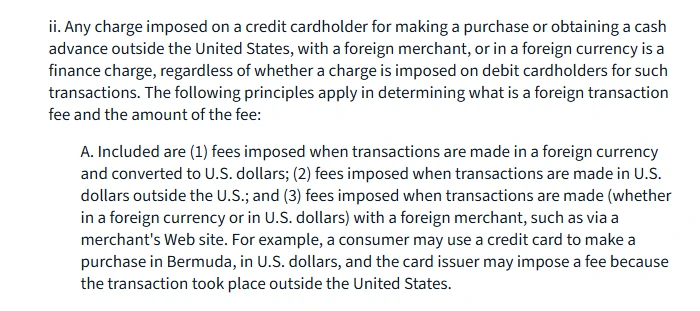
There can be. In the United States, the CFPB's official interpretation of Regulation Z counts three kinds of foreign transaction fee: fees for transactions made in a foreign currency and converted to US dollars; fees for transactions made in US dollars outside the US; and fees for transactions with a foreign merchant, whether in a foreign currency or in US dollars, "such as via a merchant's Web site". It gives an example: a consumer pays in US dollars in Bermuda, and the issuer may charge a fee because the transaction took place outside the United States.
Banks elsewhere set their own rules in their fee tables: some charge only on foreign-currency payments, some also charge on home-currency payments to merchants abroad, and some cards charge nothing at all. To find out for your card:
- Find the fee table. For a credit card, the cardholder agreement or the rates and fees table; for a debit card, the account's fee schedule. Look for the foreign transaction fee line.
- Read what triggers it. Does it say "transactions in a foreign currency", or "transactions outside the country" or "with merchants abroad"? With the second kind, paying a foreign site in your own currency can still be charged.
- If it isn't clear, call the number on the card. Ask: "If I pay a foreign website in my own currency, is there a fee, and what is the rate?"
Seeing your own currency on the checkout page doesn't mean there's no fee: if the merchant is abroad, or the merchant did the conversion, the line can still show up.
Pay in local currency or USD at checkout: which to pick
Some checkouts offer to charge you in your card's currency, for example showing a US$20 price as an amount in your own currency for you to confirm. This is dynamic currency conversion (DCC): the merchant or its payment processor does the conversion, at a rate it sets.
The EU regulates this directly. Under Regulation (EU) 2019/518, from 19 April 2020 whoever offers this conversion must express the total conversion charges as a percentage mark-up over the latest euro reference rates from the European Central Bank, and the regulation's recitals say that for online purchases this should be shown on screen, with the amount to the merchant and the total you pay given before you pay. Outside the EU you may see only one converted total.
How to compare the two prices:
- Note both numbers: the merchant's price in its own currency, and the total offered "in your currency".
- Convert it yourself: use Visa's or Mastercard's exchange rate calculator to turn the merchant's price into your currency at the day's rate, then add your card's foreign transaction fee. The site's currency converter can do the sum with the rate and fee you see.
- Pick the smaller one. When you can't tell, it's worth paying in the merchant's currency: the conversion is then done by the card network and your issuer, the rate can be looked up on the network's site, the fee is in your fee table, and you can check it afterwards.
One case isn't DCC: a service that prices by country and lists the price in your currency, such as app stores or Steam's regional pricing. That's the merchant's own local price, not a conversion. If the merchant is abroad, though, your issuer may still charge as described above; how to check regional prices is in Steam regional pricing.
Paying in another currency with PayPal: what it costs
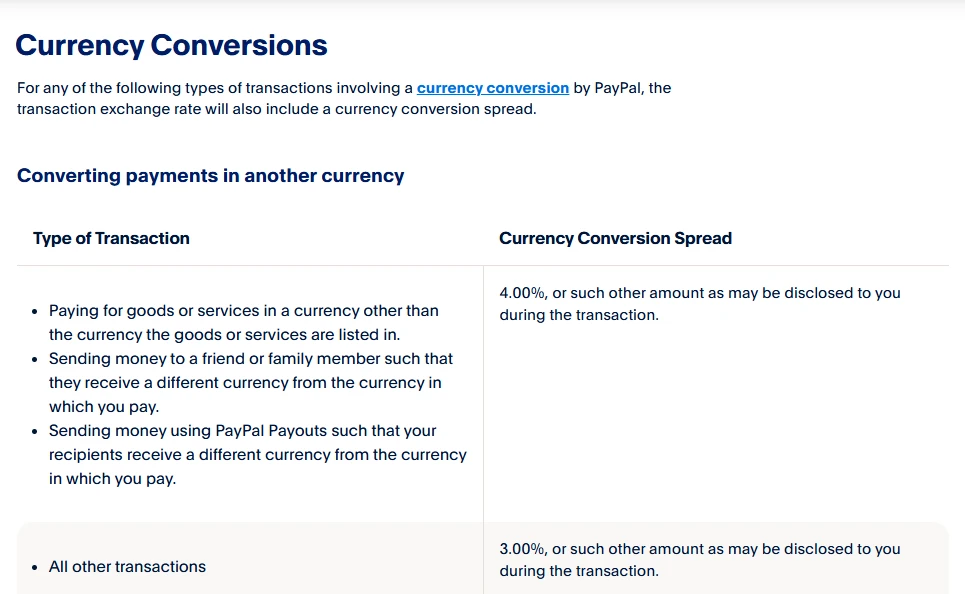
PayPal's US consumer fees page (updated 19 May 2026) says that for any transaction where PayPal converts currency, the exchange rate includes a currency conversion spread. Paying for goods or services in a currency other than the one they're listed in carries a spread of 4.00%, "or such other amount as may be disclosed to you during the transaction"; all other conversions carry 3.00%.
PayPal accounts in other countries have their own fee pages, and the figures can differ; look for the currency conversion section on the PayPal fees page for your country. After PayPal converts, your card is charged the converted amount; if your card also charges on payments to foreign merchants, an extra line can still appear. If the payment page lets you choose how the conversion is done, compare the two totals the same way as in the section above.
Already charged: how to find where the extra went
- Find the payment: on your statement or in the banking app, note the original foreign amount and the amount posted.
- Work out the rate you got: posted amount divided by the foreign amount.
- Compare with the network rate: look up the rate for that date on Visa's or Mastercard's calculator and see how far apart they are.
- Look for the fee line: some banks list the foreign transaction fee separately, others fold it into the posted amount.
- If the gap is bigger than your fee table says, call the issuer. Ask three things: which date's rate was used, which fees were charged, and how much each was.
If the posted amount matches the total in your currency that you confirmed at checkout, you most likely chose "pay in your currency" and the conversion was done on the merchant's side; then the thing to compare is that total against your own conversion, as in the section above.
Monthly subscriptions: how a small fee adds up over a year
These fees are charged per payment, so a subscription billed monthly gets charged each month. A hypothetical example: a US$20 monthly plan, and suppose your card charges 3% (an illustration only; use the figure in your own fee table). That's 60 cents a month, US$7.20 a year.
- Use a card without the fee for overseas subscriptions; the fee table shows 0 or "none" on that line.
- Check whether the service has a local price for where you live; some price by country, and the local price can come out lower than the converted dollar price.
- Add up the routes side by side: the subscription cost calculator shows a year's total, and the payment fee comparison puts card, virtual card and gift card costs next to each other.
If a renewal fails and you need to change the card, the steps are in Netflix and Spotify renewals and paying for AI subscriptions.
A few questions people ask
- Is there always a fee when I pay a foreign website?
- No, it depends on your card: some charge on foreign-currency payments, some also on payments to merchants abroad, and some charge nothing. Check the foreign transaction fee or currency conversion fee line in your fee table, and if it isn't there, call the number on the card.
- Is it better to pay in local currency or USD at checkout?
- Compare the two totals: convert the merchant's price at Visa's or Mastercard's rate for the day, add your card's fee, and set that against the "pay in your currency" total. In the EU, whoever converts has to show the mark-up as a percentage over the ECB rate. If you can't tell, pay in the merchant's currency.
- Checkout showed my own currency. Why is there still a fee on my statement?
- If the merchant is abroad, some cards charge on that too. In the US, the CFPB's official interpretation says transactions with a foreign merchant, whether in a foreign currency or in US dollars, such as via a merchant's website, fall within foreign transaction fees.
- How much does PayPal charge to convert?
- PayPal's US consumer fees page says that when the payment currency differs from the listing currency, the exchange rate includes a 4.00% spread, or such other amount as is disclosed during the transaction. For accounts in other countries, see the PayPal fees page for that country.
Checked on 2026-10-29: the CFPB's official interpretation of Regulation Z section 1026.4, Regulation (EU) 2019/518 as adopted, and PayPal's US consumer fees page (version of 19 May 2026). Issuers' rates differ, so this guide doesn't quote a figure for any bank; work from your own card's fee table. Updated 2026-10-29.
References
- CFPB: official interpretation of Regulation Z section 1026.4
- Regulation (EU) 2019/518 on cross-border payment charges and currency conversion charges
- PayPal: consumer fees (United States)
- Visa: exchange rate calculator
- Mastercard: currency converter
The first is US law, showing that paying a foreign merchant online falls within foreign transaction fees; the second is the EU rule on how conversion mark-ups are disclosed; the 4.00% in the third applies to US PayPal personal accounts. The Visa and Mastercard calculators are for looking up the network rate on the day of a transaction.