A failed streaming charge usually isn't about your balanceRenewals and payment troubleshooting for Netflix, Spotify and other subscriptions

The charge fails, and the first thing almost everyone does is check the balance. But a streaming service that can't take your money usually has nothing to do with how much is in the account. It is that the card you linked can no longer be charged. Subscriptions run on recurring charges: every month the service pulls a payment from the saved card automatically, without asking you to type the number again, which is a completely different thing from buying something once. An expired card, a virtual card that won't allow recurring charges, a billing region that doesn't match your account, a one-off bank risk check. Any of these breaks the renewal. Two readers in mind: the one whose subscription stopped for no visible reason though they can clearly afford it, and the one shopping for a card that will keep charging reliably for years. If you came here hoping to switch to a cheaper region, you may change your mind by the end.
What's in this guide (open the outline)
- A subscription is a recurring charge, not a one-off payment
- Five common reasons a renewal fails, check them off
- Read that "payment failed" message: what it's really saying
- For the long term, pick a method that charges reliably
- Region and price differences: don't lose the account chasing a switch
- How to confirm your card can be charged again and again
- When to stop and not re-link
- A few questions people ask
A subscription is a recurring charge, not a one-off payment
Buying a coffee or paying for a taxi is a one-off payment: the money moves, the transaction is done, and the service has nothing more to do with your card. A subscription isn't like that. The moment you tap "start membership", you're really authorizing the service to pull money from this card again and again: next month, the month after, charged automatically when the date comes around, no card number re-entered. The industry name for this is a recurring payment.
That's the key difference: whether a card can complete this one payment and whether it can be charged repeatedly are two separate questions. Some cards swipe fine once but never accept a recurring authorization. Others link successfully on day one, then quietly stop working a few months later for some reason. That's why a failed renewal feels so baffling: it was working perfectly when you signed up, so why did it cut out at renewal time?
Once this clicks, you stop circling the thought "but there's money in my account". A failed renewal is never about your balance. The question is whether this card is still willing and able to be charged one more time by the service.
Five common reasons a renewal fails, check them off
Almost every broken renewal lands in one or two of the five below. Read down the list and you'll usually know where you're stuck.
- The card expired. The most common reason, and the easiest to overlook. The card was still valid when you linked it; a few months later it was reissued with a new expiry date, the service is still trying the old one, and the charge fails. When you replace a card or it expires, remember to update it on the service.
- The virtual card doesn't support recurring charges. Some single-use or prepaid-style virtual cards only cover "this one" payment, so when the service tries again next month it gets rejected. Subscription merchants tend to be more sensitive about prepaid cards anyway, which we'll come back to.
- The card's region doesn't match the account's. The account is registered in region A but the linked card was issued in region B, and when the service runs a region check at renewal, the mismatch gets it blocked. This is where region-switchers most often trip.
- The bank's risk control stepped in. Now and then the issuer's risk system flags a cross-border subscription charge as suspicious and blocks it temporarily. This usually clears once you confirm it's you, the "add one step and it works" kind.
- The card itself doesn't do foreign-currency online or certain merchants. Some local debit cards aren't enabled for cross-border online use at all, or block "subscription" merchant types by default. No amount of re-linking helps these.
Many people see "payment failed" and rush to top up, assuming it's a balance problem. But if the card has expired, the region doesn't match, or the virtual card won't take recurring charges, adding money does nothing: the service never reached the card in the first place. Work out whether it's "couldn't charge the card" or "charged it but funds were short" before you decide between topping up and switching cards. Don't get the direction backwards.
Read that "payment failed" message: what it's really saying
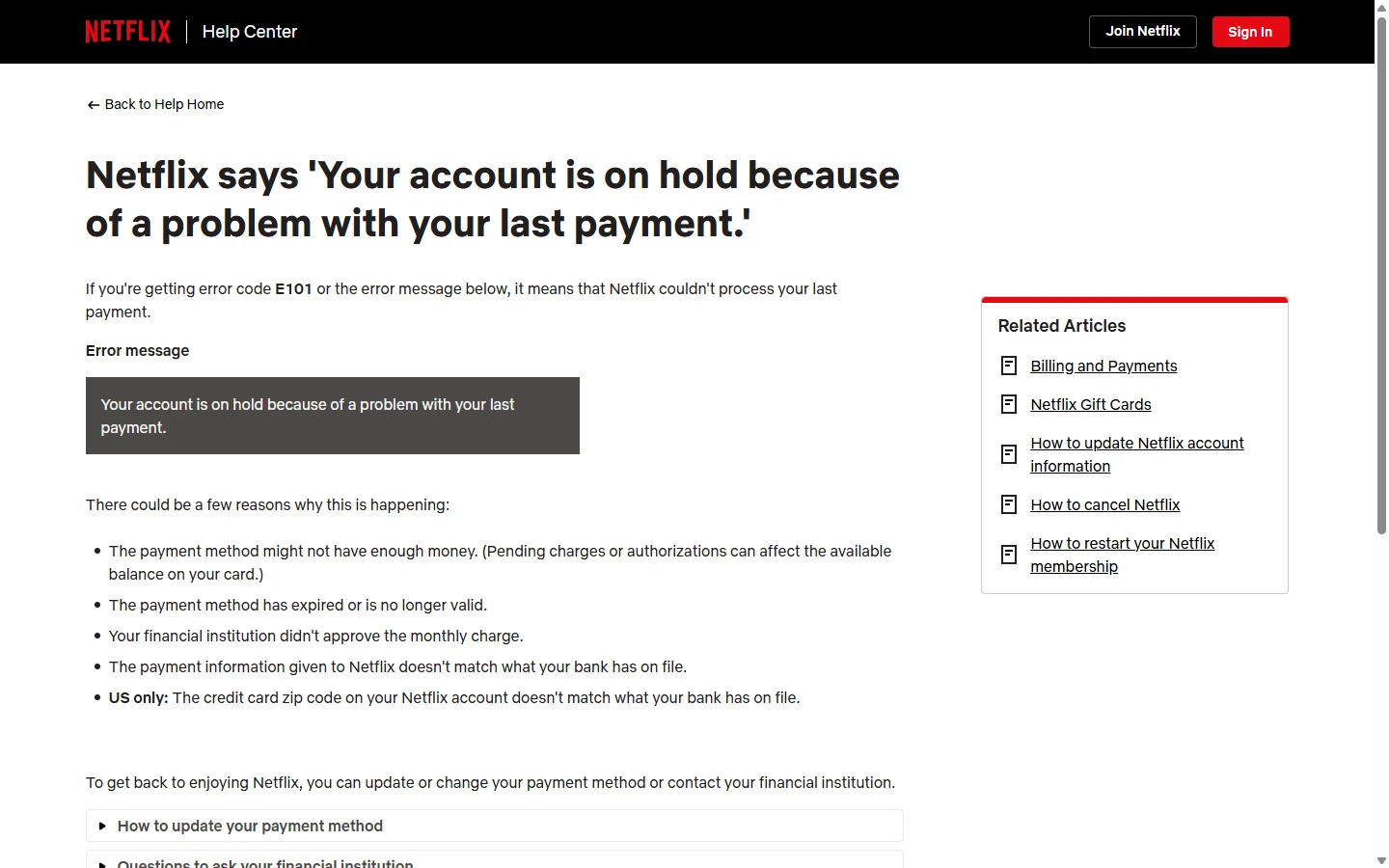
The alerts that services and banks send are often deliberately vague; they won't spell out the exact reason. Here's the one you'll meet most in a subscription, taken apart: what it actually means, and which way to look.
Streaming email / app banner"We couldn't process your payment. Your membership will pause in X days."
For the long term, pick a method that charges reliably
Once you've narrowed down the cause, what really saves you trouble is linking a method that handles recurring charges reliably from the start. The worst thing about a subscription isn't paying a little more; it's having it cut out one day. A broken renewal can mean losing continuous watch history or a promotional rate, and re-subscribing means walking through the whole flow again. When you pick a method, look at these first:
- It clearly supports recurring / auto-renewal. This is the baseline. Don't link a single-use, throwaway card number to a subscription; it will almost certainly fail to charge by month two. Before opening a virtual card, confirm it supports recurring charges. How to pick one is in Virtual cards, explained: what they can and can't do.
- The expiry date is far enough out, and you can renew it early. Linking a card that's about to expire is laying a trap for yourself. Pick one with a long expiry, and build the habit of updating it on the service before it lapses.
- The issuing region matches or is compatible with your account region. This sidesteps the region check at renewal and a whole category of hassle with it.
- The balance or limit model suits small monthly charges. A subscription is a small, regular charge. Choose something where you can reliably keep funds available and won't get declined because you forgot to top up.
If your everyday card keeps getting rejected on subscriptions and you've confirmed it's not expiry or region, the card probably isn't suited to recurring charges, and switching rails beats forcing it. For the full order in which to check a rejected payment, see After a payment is declined, work through this checklist.
Region and price differences: don't lose the account chasing a switch
The same subscription costs different amounts in different countries, which makes "switching to a cheaper region" tempting. The risk is as real as the saving.
Price differences come from local pricing, taxes and exchange rates, which is normal. But "moving" an account to another region usually requires linking a payment method issued in that region; otherwise the region check at renewal will block it, and the subscription cuts out anyway. The trap is specific to a recurring charge: the mismatch doesn't bite on day one, it bites months later on some renewal date, and by then you've built a watch history or a promo rate you don't want to lose. The little you save each month rarely covers what a broken renewal takes with it. The wider account-level fallout from hopping regions isn't specific to subscriptions; the Steam region guide works that side through in more detail.
Each service's rules on "switching regions" and how it treats payment methods from different regions follow what its official help page says at the time, and they can change without notice. Pricing, availability and whether cross-region is allowed: this site hard-codes none of it. If you really mean to switch, read the official terms carefully first, and don't test it on your main account.
How to confirm your card can be charged again and again
Rather than get caught off guard on renewal day, spend a few minutes ahead of time confirming your card can actually take a recurring charge. This works with your card, your phone and the service's account page:
- Check the linked card's status in "payment methods / manage subscription". Many services mark whether a card is "valid" or "invalid / expiring soon". If it looks off, update the card here rather than waiting for the charge date.
- Confirm the card's expiry is later than the next charge cycle. If the date printed on the card is earlier than your next renewal, it definitely won't charge; swap it early.
- Run a full cycle on a small or monthly plan first. Before committing to an annual plan, use the same card on a cancel-anytime monthly plan and let it auto-renew once for real. If it renews, the card takes recurring charges; if it dies in month two, it only does single payments, so swap it sooner rather than later.
Tick the boxes below before you link a card or before a renewal. Tick them all and your card can broadly handle a subscription's recurring charges; if any one won't tick, that's a potential break point, so fix it first.
- This card clearly supports auto-renewal / recurring charges (not a single-use number)
- The card's expiry is later than the next charge date, and I know to update it before it lapses
- The card's issuing region matches the subscription account's region or is accepted by the service
- This card supports foreign-currency / cross-border online transactions (local debit cards may not be enabled)
- The account holds enough balance or limit to cover that small monthly charge
- I've confirmed in the service's account page that the linked card shows as "valid"
When to stop and not re-link
If forcing the card through once didn't work, forcing it a second time usually won't either. In these two situations, stop trying for now:
One: the same card has failed several renewals and you're still retrying. Several failures in a short window read as a fraud signal to the issuer's risk control, which may lock the card temporarily, and that's more hassle. Stop after two or three failures and go find the cause, expiry, region or risk control, then re-link to fit.
Two: someone offers to "renew your membership cheaply, just give me the account password, card number and verification code", or tells you to pay an "unlock fee or deposit first" before it can activate. That's the most common scam script in the subscription world. A legitimate renewal never needs you to hand your account password or full card details to a third party, and there's no such thing as "pay first before you can renew". If you see it, stop and give nothing. For more on the patterns, see How gift cards actually work, and how they get used to scam people.
A few questions people ask
- There's money in my account, so why does the subscription still fail to charge?
- Because a failed renewal mostly isn't a balance problem; it's that the card can't be charged: an expired card, a virtual card that won't renew, a region mismatch, or a temporary bank block. Check the linked card's status in the account page first, then look for a bank block alert, instead of rushing to top up.
- Will a virtual card make my streaming more likely to cut out?
- It depends on whether that virtual card supports recurring charges. A single-use, throwaway number linked to a subscription will almost certainly fail by month two. If you want to use a virtual card, confirm it clearly supports auto-renewal before linking it to a long-term subscription.
- Is switching to a cheaper region worth it?
- Not necessarily. Switching regions usually means linking a payment method from that region, or the region check at renewal blocks it; some services also treat a long-running mismatch as a violation that can affect the account. Read the official terms carefully before switching, don't risk your main account, and remember the saving may not be worth it.
- If the renewal breaks, will I lose my watch history or membership?
- It depends on the service's rules. Most give a few days of grace, and paying within that window usually causes no harm; but drag it out and the service may pause, and some promotional rates or continuous-subscription perks can lapse. If you see a "pauses in X days" notice, the safest move is to swap the card and renew within the grace window.
Sources to check: this guide gives no specific prices, fees or promises. For each service's subscription price, accepted payment methods, region-switch rules and renewal policy, rely on the streaming service's official help page at the time, and on the prompts your issuer's app or support gives you; this guide only explains how recurring charges work and how to narrow things down. Updated 2026-09-08.
References
Both come from Netflix's help centre. Other services set renewal and region rules their own way, so don't carry these conclusions straight across.