Card decline code 05, 51 or 57? What each one meansDo Not Honor, Pick Up Card, Refer to Card Issuer and the rest: what you can fix yourself, when to call the bank, and when to stop trying

A two-digit code such as 05, 51 or 57 on a failed payment usually comes from the bank that issued your card, sometimes from the card network or the payment processor, and a given number means much the same on Visa and Mastercard. Sort it by what to do next. Typed something wrong (14 card number, 54 expiry, N7 security code): check and re-enter. Not enough money or too many attempts (51, 61, 65): check your available credit, lower the amount or ask the bank. The bank won't approve it (05 Do Not Honor, 01 Refer to Card Issuer, 57, 62): call the number on the back of the card. Stop using the card (04 and 07 Pick Up Card, 41 lost, 43 stolen): don't try it again. Systems didn't answer (91, 96): pay again later. Find your code in the table below; on a UnionPay card, 05 means something else.
What's in this guide
- Card decline codes table: what 05, 51, 57 and the others mean
- 05 Do Not Honor: the bank declined and won't say why
- 51, 61, 65: balance, amount limit or number of transactions
- 57 and 62: the card isn't allowed for this kind of payment
- Pick Up Card, 41 and 43: stop using this card
- 14, 54, N7: card number, expiry date or security code wrong
- No code, just "Your card was declined"
- A few questions people ask
Card decline codes table: what 05, 51, 57 and the others mean
This table follows the Visa section of Stripe's public list of network decline codes, read on 21 October 2026; the "Wording" column copies Visa's text. The Mastercard list gives the same numbers much the same meaning. UnionPay differs on a few codes, most noticeably 05, covered in the next section.
| Code | Wording (Visa) | What it means, first step |
|---|---|---|
| 01 | Refer to card issuer | The bank wants you to contact it. Call the number on the card |
| 04 | Pick up card (no fraud) | The bank wants the card taken back. Stop using it, call the bank |
| 05 | Do not honor | Declined by the bank with no reason given. Ask the bank why |
| 07 | Pick up card, special condition (fraud account) | Card to be taken back, account flagged for fraud. Stop using it, call the bank |
| 12 | Invalid transaction | The transaction itself isn't accepted. Try another card or method |
| 14 | Invalid account number (no such number) | No such card number. Check the number against the card |
| 41 / 43 | Lost card / Stolen card, pick up | Reported lost or stolen. Stop using it; if you didn't report it, call the bank now |
| 51 | Not sufficient funds | Not enough balance or available credit. Check what's available, lower the amount or use another card |
| 54 | Expired card or expiration date is missing | Card expired or expiry left blank. Check the date; use the replacement card if you have one |
| 57 | Transaction not permitted to cardholder | The card can't be used for this type of payment. Ask the bank what's switched off |
| 59 | Suspected fraud | The bank suspects fraud. Call to confirm it's you |
| 61 | Exceeds approval amount limit | Over the card's amount limit. Lower the amount or ask for a higher limit |
| 62 | Restricted card (card invalid in this region or country) | Card can't be used in this region or country. Turn on overseas use, or use another card |
| 65 | Exceeds withdrawal frequency limit | Too many transactions. Stop retrying, ask the bank when it resets |
| 91 | Issuer or switch inoperative… | The bank or the network didn't respond. Pay again later |
| 93 | Transaction cannot be completed, violation of law | Blocked for legal reasons. Call the bank, or pay another way |
| 96 | System malfunction | System fault. Pay again later |
| N7 | Decline for CVV2 failure | The three-digit security code failed. Check it and re-enter |
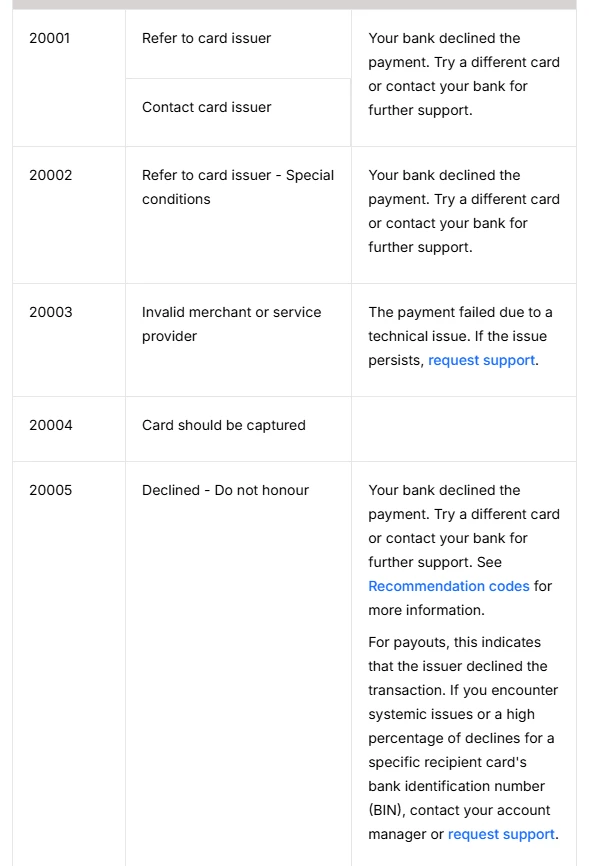
Some checkouts show a longer number such as 20005; that's the payment company's own numbering. In Checkout.com's list, 20001 is Refer to card issuer, 20005 is Declined - Do not honour and 20051 is Insufficient funds, so for these the last two digits match the table above. Other companies number differently, so the English reason next to the number is the safer thing to go by.
05 Do Not Honor: the bank declined and won't say why
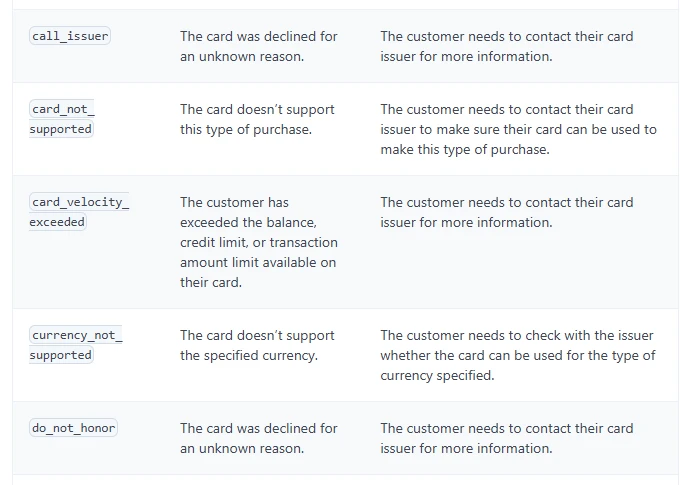
05 is the most common and the least helpful: the issuing bank declined the payment, and the code carries no reason. Stripe describes do_not_honor as "The card was declined for an unknown reason", and its only next step is that the customer needs to contact their card issuer. Checkout.com's message for customers says the same thing: your bank declined the payment, try a different card or contact your bank. The reason sits with the bank; neither the shop nor the payment page can give it to you.
Before you call, it helps to have these ready, which saves a round of questions:
- The payment details: time, amount and currency, the merchant name as it appears on statements, and the exact wording on the page, such as "05 Do Not Honor".
- Ask why: "Why was this declined?" The reason is visible to the bank's staff even when the checkout showed nothing but 05.
- Ask whether it can go through: if it was a fraud check, ask them to confirm it's you so you can pay again; if it was a limit or an overseas or online setting, ask them to change it while you're on the phone.
A fuller list of what to ask is in the "Please contact your bank" section of the decline checklist.
In Stripe's UnionPay list, 05 reads "ID certification fails", meaning the cardholder's identity check failed; the Cybersource list on the same page puts it as "Declined. Failed cardholder certification". If a UnionPay card returns 05 online, it's worth checking that the name, ID number and phone number the checkout asked for match what the bank holds, then calling the bank. UnionPay's 57 and 65 are close to Visa's, and 01, 04, 14, 51, 54 and 62 mean the same.
51, 61, 65: balance, amount limit or number of transactions
All three mean "not enough", but not enough of different things:
- 51 Not sufficient funds: the available balance or credit isn't enough. Mastercard's list says "Insufficient funds / over credit limit". You can see 51 with money apparently in the account: on a credit card, payments that are authorised but not yet posted come off your available credit, and some cards have a separate limit for overseas or foreign-currency spending. Check "available credit" in the banking app rather than the statement balance.
- 61 Exceeds approval amount limit: over the card's amount limit. The code doesn't say whether that's a per-payment or a cumulative limit. Lower the amount, or ask the bank whether it can raise the limit for now.
- 65 Exceeds withdrawal frequency limit: too many transactions. The thing to do now is stop and ask the bank when the count resets. Mastercard's list also notes that 65 can be an Identity Check (3D Secure) soft decline; if a Mastercard payment online returns 65, it's worth making sure the banking app or SMS verification step was completed, then paying once more.
If the checkout shows "card velocity exceeded" in words, Stripe describes it as the balance, credit limit or transaction amount limit being exceeded, so treat it like 51 or 61: check your available credit, then talk to the bank.
57 and 62: the card isn't allowed for this kind of payment
57 Transaction not permitted to cardholder means this card can't be used for this type of transaction. Which restriction applies (online payments, overseas payments, a type of merchant) the code doesn't say; the bank does. Before calling, open the card settings in your banking app and check that both overseas and online (card-not-present) payments are on. Many banks keep these as separate switches, and with only "abroad" switched on, foreign websites still decline; where the switches sit is in how to unblock international payments.
62 Restricted card carries the note "card invalid in this region or country" in Visa's list. Paying a foreign website and getting 62, first check that overseas use is switched on; if it is and 62 comes back, ask the bank whether the card is restricted in the merchant's region, or use another card. 93 (violation of law) means the bank can't complete the payment for legal reasons; only the bank can explain, or you pay another way.
If the bank says it didn't block anything and the shop still declines, the shop may not accept your type of card at all, for example by blocking prepaid or virtual card ranges; see virtual card declined by a merchant.
Pick Up Card, 41 and 43: stop using this card
04 Pick up card, 07 Pick up card, special condition, 41 Lost card and 43 Stolen card all tell a card terminal to keep the card. Online there's no card to keep, so in practice the bank has stopped the card: reported lost or stolen, or flagged for fraud. In Checkout.com's list the equivalent reads 20004 Card should be captured.
- Stop paying with this card. A different site or a different amount won't get through, and don't try the number elsewhere.
- Call the number on the back of the card. Ask whether it has been reported lost, frozen or replaced, and whether anything was flagged as suspicious.
- If you never reported the card lost but see 41, 43 or Pick Up Card, it's worth going through recent transactions for anything that wasn't you, and telling the bank on the same call.
Some checkouts add a suffix such as "- SF" or "- NF" after Pick Up Card. Those suffixes come from individual processors, and we found no public official definition; Visa's list labels 04 "no fraud" and 07 "fraud account". Either way the step is the same: stop using the card and call the bank.
14, 54, N7: card number, expiry date or security code wrong
This is the one group you can fix yourself:
- 14 Invalid account number: no such card number. Re-enter it from the card or the card details in your banking app, watching for missing or swapped digits.
- 54 Expired card: the card has expired, or the expiry date was left out. A replacement card comes with a new expiry date and security code; a regenerated virtual card gets a new number too, so update the card saved with the merchant.
- N7 Decline for CVV2 failure: the three-digit code on the back didn't match. Check and re-enter; Visa's 82 (Negative CAM, dCVV, iCVV, or CVV results) belongs in this group too.
If the same card still fails after two or three careful attempts, it's better to stop, use another card, or call the bank to confirm the card details.
No code, just "Your card was declined"
Plenty of checkouts show only "Your card was declined" and no code. That doesn't mean the bank gave no reason: Stripe's list tells merchants to show customers a plain decline for lost cards, stolen cards, suspected fraud and the merchant's own block list. So a vague message can hide any code in the table above, or a block set by the shop itself.
To find out the actual code:
- Ask the bank: the reason is on the bank's record, and quoting the time and amount is enough for them to find it.
- Ask the merchant's support: the merchant sees the code and reason returned to it, and some will tell you.
- Match the wording: if all you have is an English sentence, look it up in the exact-wording table in the decline checklist; for Google Play's codes that start with OR, see Google payment error codes.
A few questions people ask
- Does 05 Do Not Honor mean something is wrong with my card?
- Not necessarily. 05 only says the issuing bank declined the payment; the code doesn't carry the reason, and only the bank can see it, so call the number on the back of the card. On a UnionPay card, 05 means the identity check failed, so check the name, ID number and phone number first.
- Can I keep retrying after a decline?
- It's better not to. 65 means too many transactions, and Pick Up Card, 41 and 43 mean the card has been stopped, so retrying won't get through until the bank deals with it. System errors like 91 and 96 are worth another try later, and a mistyped number, expiry date or security code needs one or two careful re-entries at most.
- Why do I get 51 when there's money on the card?
- 51 looks at the available balance or credit. On a credit card, authorised but unposted payments come off what's available, and some cards have a separate limit for overseas or foreign-currency spending. Check the available credit in your banking app, or ask the bank which limit stopped this payment.
- Is 05 on a UnionPay card the same as 05 on Visa?
- No. In Stripe's lists, Visa's 05 is Do not honor, a decline with no reason given, while UnionPay's 05 is ID certification fails, a failed cardholder identity check. With a UnionPay card, check the identity details the checkout asked for, then call the bank.
Checked on 2026-10-21: Stripe's decline codes page and its network decline codes page (the Visa, Mastercard and UnionPay lists), and Checkout.com's response codes page. The English wording differs a little from one checkout to the next; if the number matches, the table above applies. Updated 2026-10-21.
References
The code wording comes from the Visa, Mastercard and UnionPay lists on the first page; the do_not_honor and card_velocity_exceeded descriptions and next steps from the second; the 20001, 20004 and 20005 numbers and customer messages from the third. The Cybersource wording for UnionPay's 05 is also on the first page.